Thursday, December 15, 2005

The Alberta Supernet Research Alliance - Broadband to the masses


The Alberta Supernet Research Alliance website is designed to keep the populace up to date on the progress of the various groups working on the design and implementation of the Supernet broadband network in Alberta. This is a commendable project seeking to wire all municipalities – urban and rural, large and small – into a high speed network. People can access all resources and view a geographic display indicating their town and the status of the network in that area.

It is also an informational website with areas for alliance members to update their research activity and a discussion forum for “other” members (like myself) who are not part of the alliance groups to also add their two cents into a discussion forum. But –alas - the only “interactive communications” area – the discussion forum – comes up as “not found”.

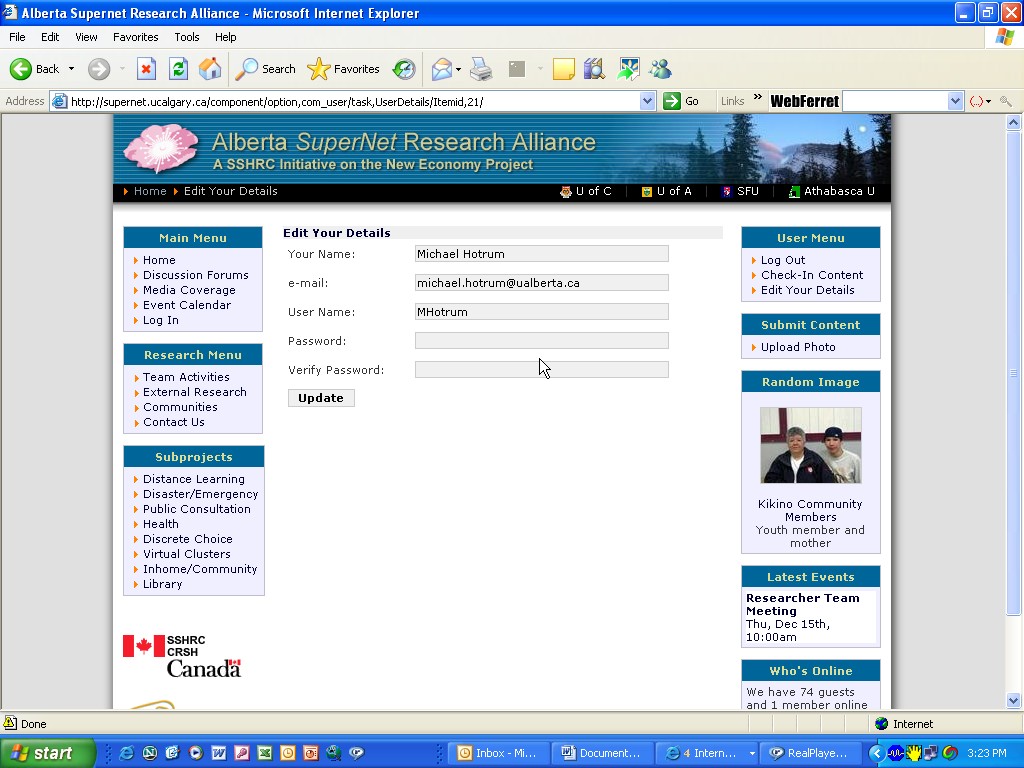
Extremely limited personailization -The profile screen shown in the screenshot area above allows me to enter name and associated organization; a photo can be added but it just goes to the random images that are displayed as the web pages change. There is also no way to search for members - online or in database.

Would this qualify as a virtual community or an informational website. Hmmm -
Virtual community – 5%
Informational website – 95%

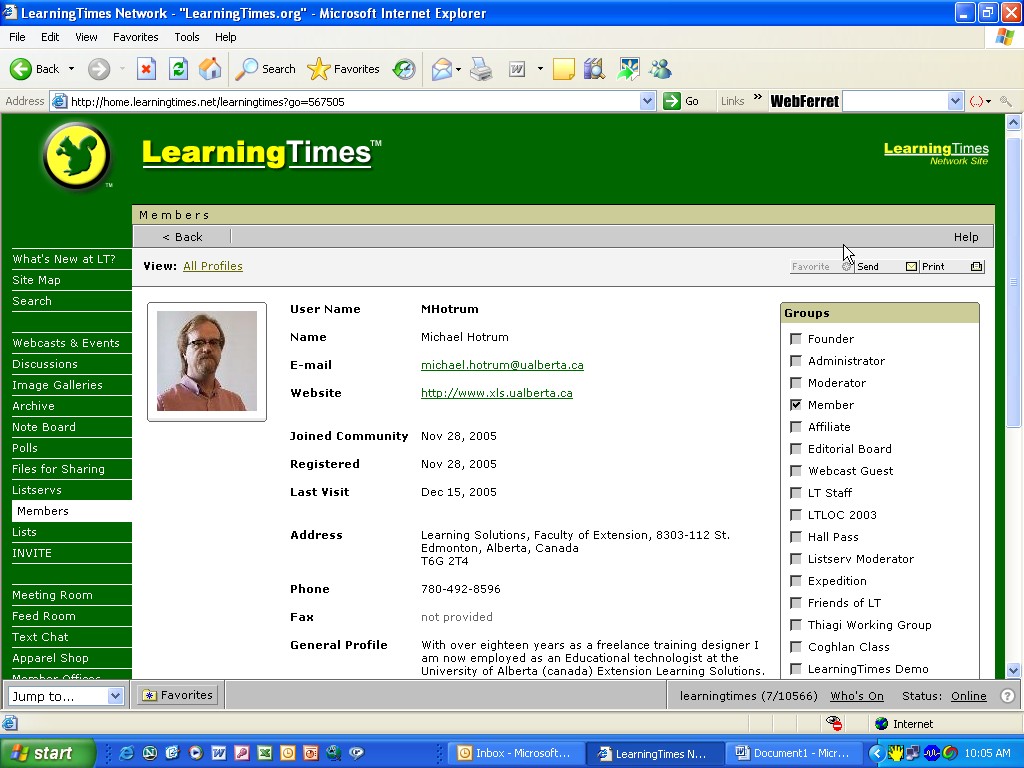
LearningTimes - online community of education and training professionals

(my personal profile shown above)
LearningTimes.org is just one of over 75 online community sites that make up The LearningTimes Network. The LearningTimes Network has about 130,000 active members.

Summary: Overall – not the personalized approach that leaves me with a feeling of having a "presence". Why not a greeter to welcome me into the community? And how do I set up my community and personalize it? How do I know where the like minded interested members are? Beyond the forums and seminars (Elluminate sessions) there isn’t much here that is for free, nor much that makes it an “open community”..

  • Members have free? access to a wide range of opportunities to interact and network with peers from across the globe. Member activities include live webcasts and interviews with industry leaders, online debates and discussions, live coverage of industry conferences, and international working groups. Also features free group collaboration tools, such as virtual meeting rooms, a site-wide instant messenger, and virtual office suites. ( they say free, but I think there are some restrictions)

    Pluses:
    The LearningTimes Meeting Room is a virtual place to meet online with colleagues – using Elluminate - live two-way audio, text chat, and a whiteboard on which you can draw, show images and snapshots of your own computer screen. Open 24 hours. (fees apply)
    Web moderator has skype – why not the members?
    Push technology - Activity updates sent to email
    Can create your own community and conduct own conference (but can’t set it up yourself)
    Member Office Suite. personal spaces for individual members to use at their discretion for meeting and collaborating with colleagues. (fees apply)
    The LOLA Awards (Live on line awards) recognize outstanding achievement in the design, delivery and production of live online learning events from across the globe. (this is nice)


    Commercial service:
    designs and produces online conferences and events
    provides the platforms, applications and promotional expertise
    Advertises featured communities (sister sites)
    producer of online educational conferences.
    Offers education courses –Certification program - $80 per hr avge 6 hrs length – ed provider is one private vendor (featured partner)
    audio blogs
    voice-based "Online Gallery Talks" (audio slide shows)
    phone-to-web audio messages and greetings
    voice email
    whiteboards, and image import tools.

    Minuses:
    The LT Feed Room contains the most recent entries from a variety of web logs ( only 4 that I saw); what criteria for them to be there?
    advisory board and editorial Board all US – mix industry/academic/educational services
    members don’t seem to want to make their identity known - anonymous faked user names
    sampling of 500 names indicate last visit was 200 days ago
    Only 27 files for sharing
    Image gallery –nice touch but impersonal
    No active polls
    5 active list serves with avge 80 messgaes
    Discussion forum - only 300 participants in 20 topical threads
    No blogs!
    Too centralized; not localized or personalized – prefer the personal linkages member profile is very limited
    Groups to join are preset (see member profile screenshot)
    Supposed to have Instant Messenger within the community to see other members online and initiate conversations with colleagues. Where?
    No open source toolsets – all are fee based and commercial offerings

Elgg - Leading Social Software - Learning Landscape


Announcing Elgg - your personal learning landscape. Drop by and claim some virtual real estate and begin inviting the neighbours over!

Link by contact, not content. Create a blog – create a profile – cite your areas of interest – find and link to others with similar interests – post pictures – create a personal presence, form relationships, engage in discussions, create your own communities!

That’s right, you heard right! Not only can you build your own personal space, you can also build a community! Bring people and resources together around a common theme. Create study groups, tutorials, research collaborations etc. All members in a community can contribute. Each community comes equipped with a community blog, file repository, wiki, syndication and access privileges.

What else you say? You want more ? This is already the best example of social software I've evr seen? What more do you want? A group calendar? You got it And we'll also throw in

1) A file repository

2) Syndication

3) Tagging/Folksonomy

4) Podcasting

Get it now! Over 3,000 are already there awaiting your arrival. And it is absolutely free! Yes FREE - Social Software at it’s best – Elgg.


Communities of Inquiry - Discussion Boards or Blogs?

James Farmer wrote a great piece in his blog Incorporated Subversion about Communication Dynamics – Discussion Boards vs. Weblogs. He based his analysis on Garrison and Anderson’s Model of a Community of Enquiry.

It’s worth summarizing here just so I have a copy that I can refer to ( I love linking back to original sources, but sometimes I just want to have my own copy too!).

Garrison and Anderson (2003) state that “a community of learners is an essential, core element of an educational experience when higher order learning is the desired learning outcome” (p 22). They went on to say that in higher education a critical community of learners, “is no longer just an ideal, but has become a practical necessity in the realization of relevant, meaningful and continuous learning” (p 23). But to achieve higher order learning we must have effective communication – to create a community of critical inquiry - this is “at the heart of all forms of educational interaction” (p. 23)

Presence: Social, Cognitive

In their research into how to create a community of inquiry Garrison, Anderson and Archer define social presence as “the ability of participants in a community of inquiry to project themselves socially and emotionally, as “real” people, through the medium of communication being used.” They define cognitive presence as “the extent to which learners are able to construct and confirm meaning through sustained reflection and discourse” (Garrison, Anderson 2000).

So, what’s the better tool for communities of inquiry - Discussion boards in online learning environments or blogs?

Traditional OLE’s are represented by the ubiquitous Learning Management System. In Canadian higher learning WebCT (merging with Blackboard) is the market leader.

So what can you do in an LMS? The primary tool for communication is the asynchronous Discussion Board. You can post messages to a shared area or reply to existing messages in order to form a thread.

There is email – but its internal to the system only – and there is no connection to individual students email accounts (hence offering no “push” facility), they add little to the overall communication dynamics of the OLE. Communication features include reading previous messages, posting new messages, and posting a reply to a previous message (in this case forming or contributing to a thread).

Is there any social presence? Can students “project themselves socially and emotionally, as ‘real’ people” (Garrison & Anderson 2003)? Can they express themselves through anything but text? Personal expressions –like a picture, a signature, link to a personal website, some identifying characteristic – can be added, but they are not accommodated easily. And they are really just afterthoughts, like ciphers in the snow that someone may click on and read, or may not, at some time. Is there anyone else on line to read it as I post it? You wouldn’t know – no presence notification advises you of anyone else being “in” the forum when you’re there. This lack of knowing if anyone is “reading” also impacts on your ability to project a presence.

What about cognitive presence? How do you engage in a community of inquiry if there is not one there? What level of discourse is possible with an audience of one? The opportunity to reflect, “construct and confirm” meaning. in a discussion board is not possible. Is anybody out there?

How about a Weblog to facilitate communities of inquiry?

With a weblog a user can add entries, publish by time and date, allow comments to be posted, let readers know when a new entry has been made. In higher education and in high schools weblogs are being used as personal online research and knowledge management tools (like I’m using this one). And many are using it as an ever-evolving e-portfolio and representation of personal identity. This is my space, I can make it my own, and choose to share my research and thoughts or not. And you can choose to respond and engage me in a discussion. And notice of your comment entry is “pushed” to me e-mail, and I can choose to respond to you immediately.

Weblogs allow social presence – the blog is private space with the blogger’s identity stamped all over it. The blogger owns the blog and the entire publication process. Although the primary communication is through text, pictures can be added, links to photo, audio or videoblogs can be inserted.

Weblogs certainly support sustained discourse as evidenced by the development and spread of linked entries throughout the blogosphere, but is the discourse reflective, critical and purposeful? By it’s nature the weblog is a reflective medium – akin to a diary or journal – and it can be archived – to create a historical portfolio of entries. It can offer both social presence and cognitive presence.

So which communication tool is best for a community of inquiry of higher order learning? I vote for the weblog. A teacher could even position their wblog as an organic central node to the class, and the “push, pull” technology of the webfeed could keep the discourse happening, and the teacher is able to facilitate and direct cognitive and social processes.
Monday, December 12, 2005

Online year end party


Kudos to Terry Anderson.
How do you have a year end party in a virtual class?

Check out the description of his online year end party with his class. Terry teaches online from Athabasca University in Alberta. At year end he had an online "celebration" with his class to end the session and to celebrate the season. A great attempt at using social software (in this case Elluminate) to "socialize" over the internet.

My 11 year old daughter is also uisng the web to socialize - Last night she installed Google talk, with visual, and she is now holding conference calls with three of her friends in Toronto ( we live in Edmonton at present). They were discussing Christmas yesterday and what each would like to receive at xmas - textual and verbal conversation were going on as well as the visual antics.


Tuesday, December 06, 2005

From E-Learning 1.0 to E-Learning 2.0

The Past E-learning 1.0 to the Future E-Learning 2.0
1. Moving from Preprogrammed/behavouristic To Connectedness/ constructivist
2. Moving from Centralized To Localized
3. Moving from Institutionalized To Personalized
4. Less Teacher control More Student control
5. Not just Teacher to Student But T to S, S to S, S to T, S to C
6. Not just Content based Now Relationship based
7. Not a Push But a Pull, attract
8. Redefine Course, program To Learning “molecules”, connections
9. From Knowledge capital To Social capital
10. Not Limiting freedom But Expanding freedom
11. No longer an Instructor Now a Learning analyst
12. From Instructional designer To Learning experience architect
13. Expand ISD To ELSD Experiential learning Systems Design (o.k. acronym has flashbacks)
14. No to WebCT Yes to Elgg, Flock

Twenty Educational Applications Of Social Software

Educational Social Software: Twenty Ways
1. Create learning environment using Flock, Moodle
2. Free data storage on Ourmedia.org
3. Build profile, community on Elgg.net or Barnraiser.org
4. Collaboratively create annotated map using Imanote.uiah.fi
5. Team communication via Socialtext.org (email, weblog,wiki,IM)
6. Collaborative document development via wikicities.com or bliki.com
7. Share bookmarked resources using Rojo.com
8. Find mobile team members using Active Campus (IM on cell phones)
9. Common calendar thanks to Calendars Net
10 Shared reminders, files, resources posted to Backpack.com
11. Audio/video conferencing via Quorum Tools or Elluminate
12. Build a learning community using Community zero
13. Learn anywhere thanks to Java enabled PDA, Cell phone
14. Mentoring/coaching through Ask Me Enterprise, coachingplatform
15. Map e-mail activity and discover level of connection with Visiblepath.com
16. Find friend of a classmate to billet with at Dodgeball.com
17. Book face to face meeting through Meetup.com
18. Visually map the social network among students using Netvis.org
19 Visually map file sharing network using InFlow.com
20. Post reflections about learning experience at Blogger.com